Are Online File Converters Safe? What Really Happens When You Upload a File
Most online file converters are safe for everyday documents, but the answer depends on how the service processes, stores, and deletes uploaded files. Some converters upload files to remote servers where they are temporarily stored during processing, while others process files directly inside your browser without sending the document anywhere.
The biggest privacy difference is where the file is processed, not simply whether the website uses HTTPS or looks trustworthy. A converter that processes files locally in your browser usually exposes less information than one that uploads every document to a server. However, every online service has its own storage policy, security practices, and data retention period.
Before uploading sensitive files such as contracts, medical records, financial statements, or identity documents, you should understand what happens after clicking Upload. File processing involves more than converting formats—it may include temporary storage, metadata handling, server-side processing, caching, encryption, and automated deletion. Each step affects the privacy and security of your document.
Understanding these steps makes it easier to decide when an online converter is appropriate and when a locally processed tool is the safer choice.
What Happens When You Upload a File to an Online Converter?
Uploading a file starts a processing workflow that allows the converter to read, analyse, and transform the document into the requested format or extract specific information from it. Although the exact process differs between services, most online file converters follow the same sequence of events.
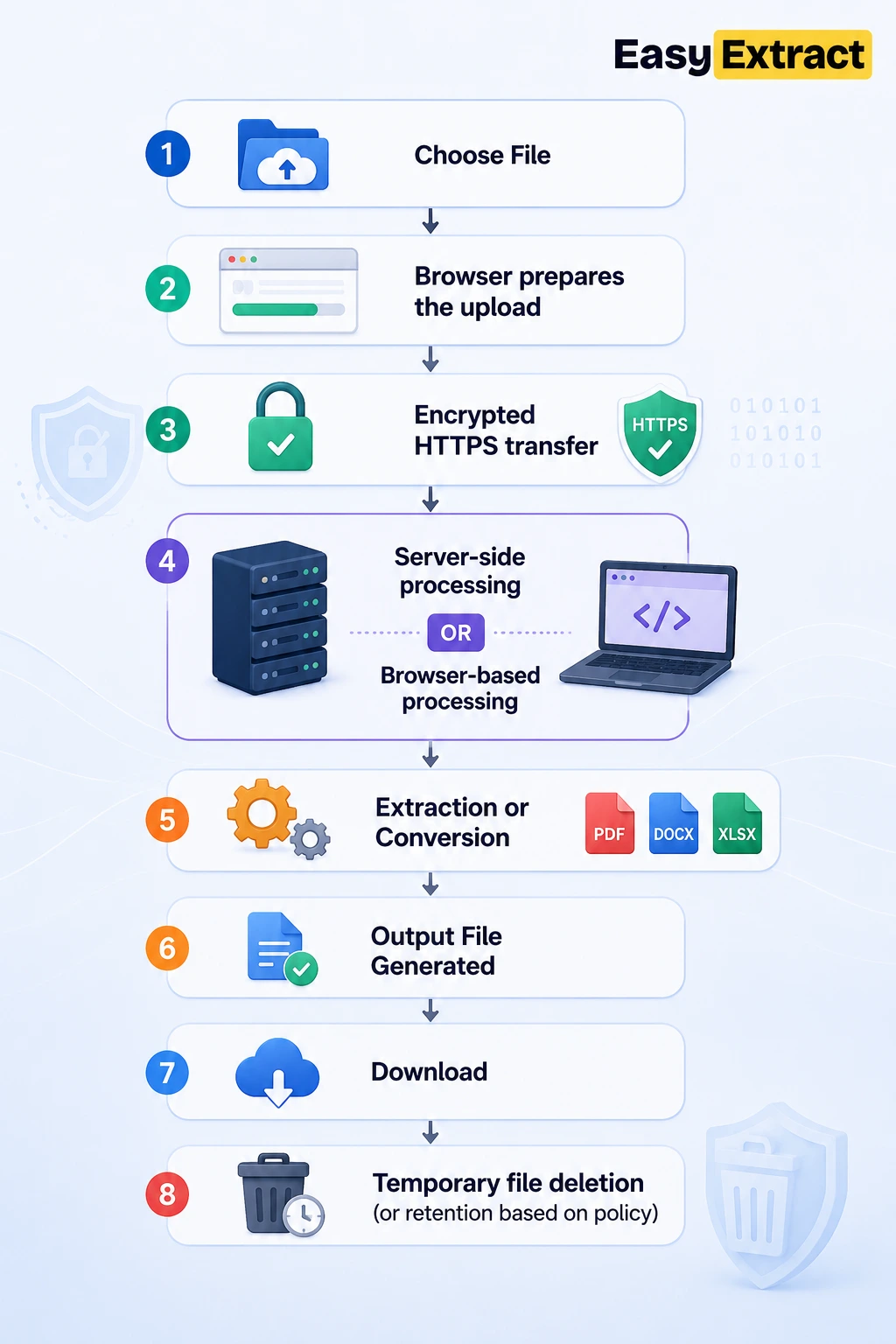
For many web-based converters, the process begins when your browser transfers the selected file to the provider’s server over an encrypted HTTPS connection. Once the upload is complete, the server temporarily stores the file, processes it using specialised software, generates the requested output, and prepares it for download. After processing, the service may immediately delete the uploaded file, keep it for a limited period, or retain it according to its privacy policy.
Some tools work differently by processing files entirely inside your browser. Instead of uploading the document to a remote server, the browser performs the extraction or conversion locally using your device’s processing power. In these cases, the original file never leaves your computer, reducing the amount of information shared with external systems.
The exact workflow determines how much control you retain over your data. Understanding where processing occurs, how long files exist after conversion, and whether copies remain on remote servers provides a much clearer picture of a converter’s overall privacy than simply knowing it is “online.”
Choose File
│
▼
Browser prepares the upload
│
▼
Encrypted HTTPS transfer
│
▼
┌────────────────────────────┐
│ Server-side processing │
│ OR │
│ Browser-based processing │
└────────────────────────────┘
│
▼
Extraction or Conversion
│
▼
Output File Generated
│
▼
Download
│
▼
Temporary file deletion
(or retention based on policy)
Where Does Your Uploaded File Actually Go?
The destination of your uploaded file depends on how the online converter is built. Some services transfer every file to a remote server for processing, while others perform the entire operation locally inside your browser. Knowing which method a tool uses is one of the most important factors when evaluating its privacy and security.
Server-based processing
Most online file converters use server-side processing. After you click Upload, your browser sends the file through an encrypted HTTPS connection to the provider’s infrastructure. The file is then stored temporarily on a server, where software reads its contents, performs the requested conversion or extraction, and generates the output file.
During this process, your document may exist in several locations, including temporary storage, processing memory, backup systems, or short-term caches. Although reputable services automatically remove temporary files after processing, the retention period varies between providers. Some delete files immediately, while others keep them for several hours or even days to support downloads or system recovery.
Browser-based processing
Some modern file processing tools never upload your document to a remote server. Instead, the browser downloads the required processing code and performs the extraction or conversion directly on your device.
In this model, the file remains on your computer throughout the entire workflow. The browser reads the document, performs the requested operation using your device’s CPU and memory, and generates the output locally. Since the original file never leaves your device, browser-based processing significantly reduces the exposure of sensitive information to third-party servers.
This approach is particularly useful when working with confidential business documents, legal contracts, financial records, research files, or personal identification documents where privacy is a priority.
Why processing location matters
The location where a file is processed determines who can potentially access it and what security measures protect it. A server-based converter relies on the provider’s infrastructure, storage policies, access controls, and deletion procedures. A browser-based converter relies primarily on your own device because the document stays within your local environment.
Neither approach is automatically better for every situation. Server processing is often necessary for complex tasks that require powerful computing resources, while browser-based processing offers stronger privacy for many extraction and conversion tasks because fewer systems handle the original file.
Before uploading sensitive documents, it is worth checking whether the tool processes files locally, temporarily stores uploads, or transfers them to external servers. Understanding this distinction provides a far more accurate picture of privacy than judging a service by its appearance alone.
Can Online File Converters Keep Your Uploaded Files?
Yes, they can—but whether they do depends entirely on the service’s infrastructure, privacy policy, and file retention practices.
Uploading a file does not always mean it disappears immediately after processing. For server-based converters, the uploaded document usually exists on the provider’s infrastructure for at least a short period while the conversion or extraction is completed. The service then decides when and how that temporary copy is removed.
Some converters automatically delete uploaded files within minutes, while others retain them for several hours or days to allow users to download the converted file again. In some cases, temporary copies may also remain in system backups, processing logs, or cached storage until those systems are refreshed according to the provider’s internal policies.
Keeping a file temporarily does not necessarily mean the service is unsafe. Temporary storage is often required to process large files, recover interrupted downloads, balance server workloads, or protect against processing failures. The important question is how long the file is retained, who can access it, and when it is permanently removed.
Temporary storage vs permanent storage
Many people assume that every uploaded file is permanently saved, but that is not how most online processing systems work.
Temporary storage exists only to support the processing workflow. Once the conversion is complete and the retention period expires, the uploaded file is scheduled for deletion. Permanent storage, on the other hand, means the service intentionally keeps the file for long-term access, account history, collaboration, or cloud storage features.
Understanding this distinction helps explain why two online converters can follow completely different privacy models even if they perform the same task.
Why privacy policies matter
A service’s privacy policy often explains how uploaded files are handled after processing. Although the level of detail varies, reputable providers typically disclose information such as:
- Whether uploaded files are stored on remote servers
- How long files remain available
- Whether files are automatically deleted
- Whether encrypted connections are used during upload
- Whether uploaded content is shared with third parties
- Whether user accounts are required to retain files
If this information is missing or unclear, users have little visibility into what happens after the upload is complete.
When should you avoid uploading sensitive files?
If a document contains confidential business information, financial records, legal agreements, medical data, passwords, or personal identification, you should verify how the service processes uploaded files before using it.
When a tool performs the entire operation locally inside your browser, the original document never needs to be transferred to a remote server. For many extraction tasks, this approach reduces the privacy risks associated with temporary server storage because fewer systems ever handle the original file
What Information Can a Website Collect Besides Your Uploaded File?
Now we’re entering the privacy attributes. This is where most competing articles become shallow. They simply say “websites may collect your data.” Instead, we’ll define what data, why it’s collected, and whether it’s related to the uploaded file.
Uploading a document does not necessarily mean the file is the only information a website receives. Depending on how the service operates, an online file converter may also collect technical information about the upload session, your device, and the processing request itself. Some of this data is essential for operating the service, while other information may be used for security, performance monitoring, or analytics.
Understanding the difference between file data and session data helps explain how online processing works and what information remains even after an uploaded document is deleted.
Information about the uploaded file
Before a converter can process a document, it usually needs basic information that describes the file. This information helps the software determine how the document should be handled.
Common file-related information includes:
- File name
- File extension (such as PDF, DOCX, PNG, or ZIP)
- File size
- File type or MIME type
- Number of pages or images
- Creation and modification dates
- Embedded metadata, when required for processing
Collecting this information does not automatically mean the service stores your entire document permanently. In many cases, these properties are simply used to prepare the file for extraction or conversion.
Information about your device and connection
When you visit almost any website, your browser automatically shares certain technical details so the service can respond correctly.
These commonly include:
- IP address
- Browser type and version
- Operating system
- Device type
- Screen resolution
- Language preferences
- Time zone
- Session identifiers
- Cookies, if enabled
This information allows the website to establish a secure connection, maintain your session during processing, detect unusual activity, and improve compatibility across different devices.
Processing and usage data
Many online services also record information about how their tools are used. Unlike the uploaded document itself, this data usually describes the processing event rather than the document’s contents.
Examples include:
- Upload timestamp
- Processing duration
- Conversion success or failure
- Error reports
- Download completion
- Number of processed files
- Server performance metrics
This operational data helps providers monitor system health, identify technical problems, and improve the reliability of their services.
Does collecting this information make a converter unsafe?
Not necessarily.
Every website requires some technical information to deliver content, maintain secure connections, and respond to user requests. Collecting an IP address or recording when a conversion occurred is a normal part of operating an online service.
The more important question is how that information is used, how long it is retained, and whether it can be linked to your uploaded files. Reputable services clearly explain these practices in their privacy policies and limit data collection to what is necessary for operating the platform.
For users handling confidential documents, browser-based processing provides an additional privacy advantage because the document itself remains on the local device, reducing the amount of file-related information transmitted to external servers.
How to Tell Whether an Online File Converter Is Safe
No online file converter is completely risk-free, but trustworthy services make it clear how uploaded files are processed, protected, and deleted. Instead of relying on appearance or popularity, evaluate a converter based on how it handles your data throughout the entire processing workflow.
The following factors provide a much better indication of a service’s security and privacy than its design or marketing claims.
Uses HTTPS encryption
A secure converter should always use HTTPS to encrypt the connection between your browser and the website.
Encryption protects uploaded files while they travel across the internet, reducing the risk of interception by third parties. You can usually verify this by checking for the padlock icon in your browser’s address bar and confirming that the website begins with https://.
Although HTTPS protects data during transmission, it does not determine what happens after the file reaches the server.
Clearly explains its privacy policy
A trustworthy service should explain:
- Whether uploaded files are stored
- How long files are retained
- When files are deleted
- Whether uploaded content is shared with third parties
- What technical information is collected
- How users can contact the provider
If a converter provides little or no information about these practices, it becomes difficult to understand how your files are handled after upload.
Explains where processing happens
One of the most important questions is:
Does the file stay on my device, or is it uploaded to a remote server?
Some converters process every document on their servers, while others perform the operation entirely inside your browser.
Knowing the processing location helps you understand who handles the original document and what level of control you retain over your data.
Automatically deletes uploaded files
Many reputable services automatically remove uploaded documents after processing or after a short retention period.
Automatic deletion reduces the amount of data stored on remote infrastructure and lowers the exposure of previously uploaded files. Some services even display the exact deletion timeframe, giving users a clearer understanding of how long temporary files remain available.
Collects only the information it needs
Reliable file processing tools generally limit data collection to information required for operating the service, securing the platform, and improving performance.
If a converter requests unnecessary permissions, requires account creation for simple conversions, or collects information unrelated to file processing, users should review the privacy policy carefully before uploading sensitive documents.
Maintains transparency
Trustworthy services explain how their platform works instead of asking users to rely solely on trust.
Transparency may include:
- Processing documentation
- Security practices
- Privacy commitments
- Data retention policies
- Contact information
- Terms of service
The more clearly a provider explains its workflow, the easier it becomes for users to make informed decisions.
A simple safety checklist
Before uploading an important document, ask yourself these questions:
✓ Does the website use HTTPS?
✓ Does it explain where files are processed?
✓ Does it publish a clear privacy policy?
✓ Does it state when uploaded files are deleted?
✓ Does it collect only the information needed to operate the service?
✓ Would you feel comfortable uploading confidential information based on the information provided?
If several of these questions cannot be answered, consider whether another service offers greater transparency or supports browser-based processing that keeps your files on your own device.
Should You Upload Sensitive Files to an Online Converter?
The safety of uploading a document depends as much on the type of information it contains as it does on the converter itself. A public brochure and a passport scan do not carry the same privacy risks, even if they are processed by the same service.
Before uploading any file, consider what information could be exposed if the document were accessed by an unintended party. The more sensitive the contents, the more important it becomes to understand how the service processes, stores, and deletes uploaded files.
Low-risk documents
Many everyday files contain little or no confidential information and are generally suitable for online conversion or extraction.
Examples include:
- Public presentations
- Product manuals
- Marketing brochures
- School worksheets
- Public reports
- Sample documents
- Images intended for publication
Even with these files, it is still good practice to use reputable services that explain how uploads are handled.
Medium-risk documents
Some documents contain personal or business information that deserves additional protection.
Examples include:
- Internal company documents
- Project proposals
- Client presentations
- Meeting notes
- Personal resumes
- Coursework
- Business spreadsheets
For these files, review the service’s privacy policy and file retention practices before uploading.
High-risk documents
Documents containing confidential, financial, legal, or personally identifiable information require the highest level of caution.
Examples include:
- Passports
- Driver’s licences
- National identity cards
- Tax returns
- Bank statements
- Medical records
- Employment contracts
- Legal agreements
- Source code
- Confidential business plans
- Customer databases
Whenever possible, these files should be processed using tools that perform the operation locally on your device or through trusted enterprise systems with clearly documented security controls.
Consider both the document and the service
Two factors determine the overall privacy risk:
1. The sensitivity of the document
What information does the file contain?
Can it identify a person?
Does it contain financial or legal information?
Would disclosure cause personal or business harm?
2. The way the service processes files
Does the tool upload files to remote servers?
Does it process files locally?
How long are uploads retained?
Who can access temporary copies?
When are files deleted?
Only by considering both factors together can you make an informed decision about whether an online converter is appropriate for a particular document.
Browser-based processing offers an additional layer of privacy
For many extraction and conversion tasks, browser-based processing reduces privacy risks because the original document remains on your own device throughout the workflow.
Instead of transferring the file to a remote server, the browser performs the required operation locally using your computer’s processing power. This approach limits the exposure of confidential information to external infrastructure while still allowing you to extract text, images, metadata, or other file contents.
Although local processing does not eliminate every security concern—for example, malware on your own device remains a risk—it removes one of the largest privacy considerations associated with many online file processing services: uploading the original document to a third-party server.
Key Takeaways
The safety of an online file converter is determined by how files are processed, where they are stored, how long they are retained, and how transparent the service is about its data handling practices. Rather than assuming every online converter follows the same workflow, evaluate each tool based on its processing model and the sensitivity of the document you plan to upload.
For everyday documents, many online converters provide a convenient way to extract or transform information. For confidential files, understanding whether the service uses server-side or browser-based processing can help you choose a solution that better matches your privacy requirements. If you want to see exactly what a browser-based tool runs locally and what data, if any, leaves your device, EasyExtract documents this in how it processes files.
Making informed decisions about file processing is not about avoiding online tools altogether—it’s about understanding what happens to your data before, during, and after the upload.
FAQ
Are online file converters safe to use?
Most reputable online file converters are safe for everyday documents. However, their security depends on factors such as encryption, file retention policies, processing location, and overall transparency. Before uploading sensitive documents, review how the service handles uploaded files and whether processing occurs locally or on remote servers.
Can online file converters keep my files?
Yes. Many services temporarily store uploaded files while processing them. The retention period varies between providers, with some deleting files immediately and others keeping them for a limited time according to their privacy policy.
Can online converters read my documents?
If a converter processes files on its servers, the service must access the file contents to perform the requested conversion or extraction. Browser-based tools process files locally, reducing the need to transfer the document to external servers.
Is browser-based processing safer?
Browser-based processing generally provides stronger privacy because the original file remains on your device throughout the workflow. While this reduces exposure to third-party infrastructure, users should still maintain good security practices on their own devices.
Does HTTPS make online converters completely secure?
No. HTTPS encrypts the connection between your browser and the website during file transfer. It does not determine how uploaded files are stored, processed, or deleted after they reach the server.
Should I upload confidential documents?
Highly sensitive files such as financial records, legal agreements, medical documents, and identification documents should only be uploaded after reviewing the service’s processing model and privacy practices. When available, browser-based processing offers an additional layer of privacy because the original document does not leave your device.